Use Case 1: Exploring Medical Device Reports with RAG and EigenLens
A measured comparison of top-N RAG and EigenLens over 20,000 device-event reports, with cluster explanations and business value.
Explore recurring patterns in your existing vector data through Python and MCP.
A RAG application can find relevant documents and answer questions about them. But what happens when the question asks about patterns across thousands of records?
What recurring problems appear in continuous glucose monitoring reports?
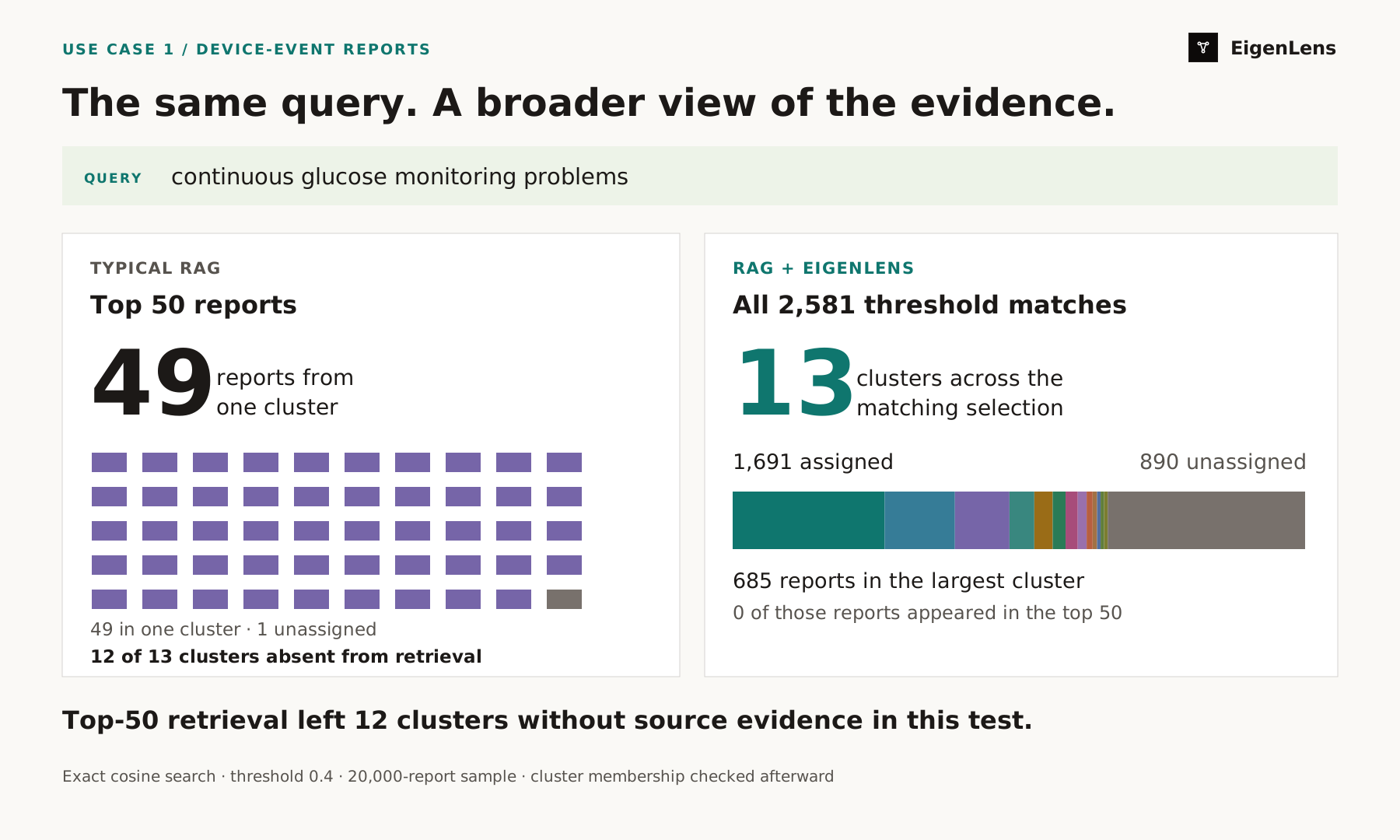
We tested this using 20,000 device-event reports. The top 50 search results represented one assigned cluster. EigenLens analyzed the broader matching selection and identified 13 clusters across 2,581 reports, with 890 reports unassigned.
EigenLens adds this analytical workflow to an existing agent: group selected records, extract topic phrases and inspect the source evidence behind each group.
Select a figure to open its full-resolution version.
The experiment
We sampled 20,000 reports from an openFDA medical-device event shard, generated MiniLM embeddings and indexed them in Qdrant. The records retained their full narrative text and original report IDs.
Both workflows used the query “continuous glucose monitoring problems”, the same embeddings and a cosine relevance threshold of 0.4:
- Typical RAG: retrieve the top 5, 10, 20 or 50 reports and ask the model to summarize recurring problems.
- RAG + EigenLens: analyze all 2,581 matching reports, then make the groups, counts, examples and plot available to the agent.
The baseline used plain cosine ranking without reranking, diversification or deduplication. It received no topic labels or counts from the broader analysis.
What top-N RAG returned
A typical retrieval-only workflow is:
Embed the query → retrieve top N records → send their text to the model → generate an answer.
Our generated answers concentrated on discrepancies between continuous glucose monitors and blood-glucose meters. The top-50 answer began:
“Recurring problems across these reports center on CGM–BG meter inaccuracy, with investigation frequently unable to determine cause or compare calibration data.”
The answer reflected the supplied evidence. That evidence was highly concentrated. After generation, we compared the retrieved IDs with the saved EigenLens assignments:
| Top N | Reports in the same cluster | Unassigned reports | Distinct narrative texts |
|---|---|---|---|
| 5 | 4 | 1 | 4 |
| 10 | 9 | 1 | 9 |
| 20 | 19 | 1 | 14 |
| 50 | 49 | 1 | 24 |
Forty-nine of the top 50 reports belonged to one cluster. All 50 IDs were unique, but several narratives were identical. None belonged to the largest, 685-report cluster in the broader analysis.
Increasing N from 5 to 50 increased model input from 1,445 to 12,752 tokens, while the selection still represented one of the 13 assigned clusters.
The top 50 contained no source reports from 12 of the 13 clusters—groups containing 1,445 reports in the broader selection. The model therefore had no direct retrieved evidence from those groups. A coherent answer could leave readers unaware that these other patterns exist in the matching records.
In this experiment, more retrieved text added evidence about the same pattern. Similarity ranking did not provide broad coverage of the matching selection. Other RAG designs, including diversity-aware retrieval, could produce different results.
What the discovered clusters mean
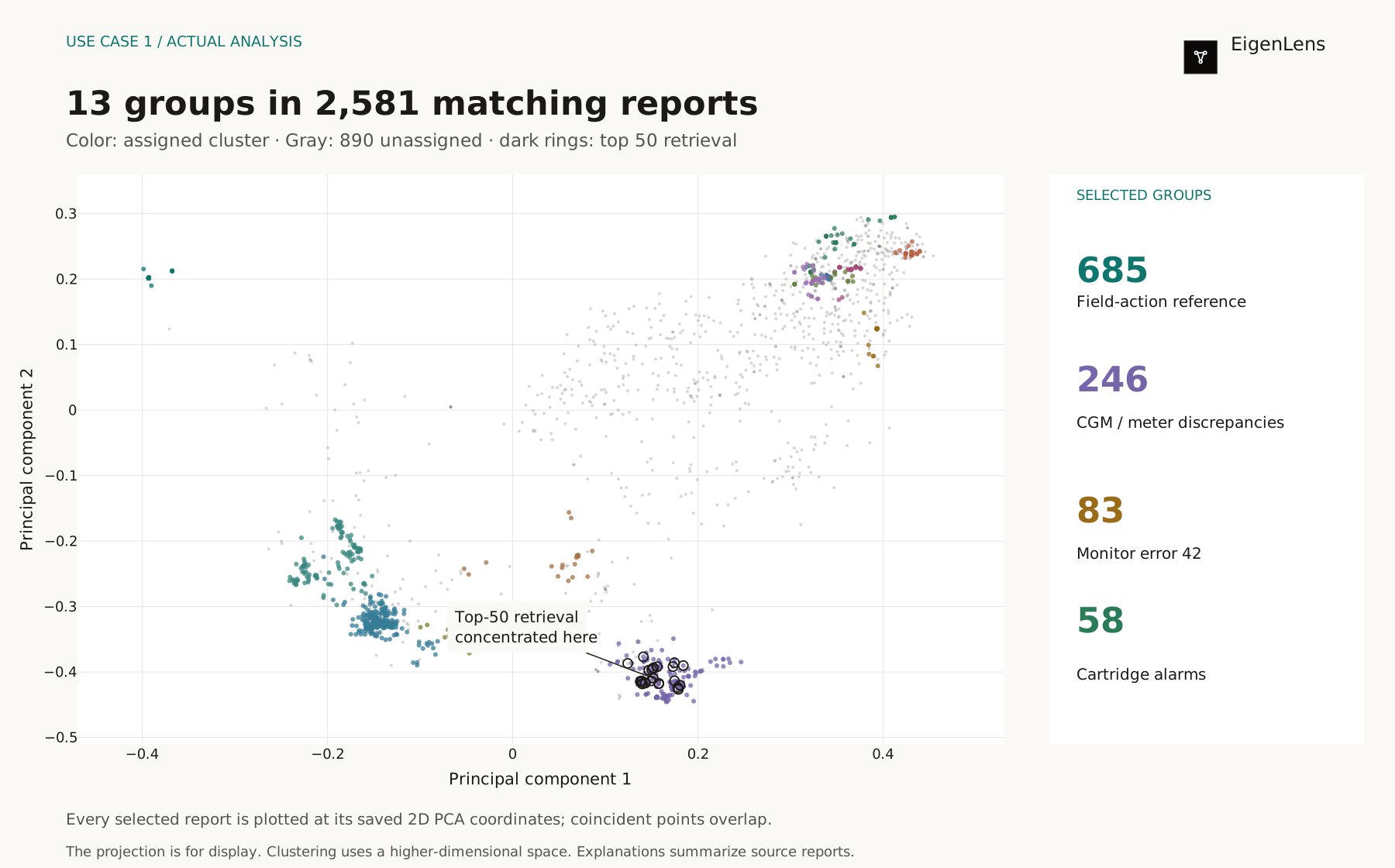
EigenLens analyzed all 2,581 threshold matches. 1,691 reports joined 13 clusters; 890 remained unassigned. Users can inspect each group's size, extracted phrases and representative source records.
These plain-language descriptions summarize representative reports; they are editorial explanations of the saved clusters.
| Cluster | Reports | What representative reports describe |
|---|---|---|
| 0 | 685 | Low readings linked in the narratives to field action FA1002-2025. |
| 2 | 317 | Sensor-versus-meter discrepancies, with products requested for investigation. |
| 4 | 246 | CGM-versus-meter inaccuracies and calibration-investigation wording; the group dominating top-N retrieval. |
| 9 | 112 | Erroneous readings, product-return difficulties and investigation templates. |
| 6 | 83 | Monitor error 42, with reported pump resets and continued use. |
| 3 | 58 | Cartridge alarms, with a reported switch to another delivery method. |
| 5 | 55 | Malfunction alarms reported as cleared after technical-support troubleshooting. |
| 10 | 40 | Malfunction alarms, with a reported switch to another delivery method. |
| 8 | 27 | Intermittent occlusion alarms, with reported continued pump use. |
| 12 | 20 | Returned-sensor investigations discussing normal termination and functional testing. |
| 1 | 16 | Minimum-fill notifications during cartridge loading. |
| 7 | 16 | Occlusion alarms, with a reported switch to another delivery method. |
| 11 | 16 | Returned-sensor investigations discussing error-triggered termination and functional testing. |
All 685 records in cluster 0 contain the field-action reference FA1002. All 83 records in cluster 6 mention “error 42,” and all 58 in cluster 3 mention “cartridge alarm.” These give reviewers concrete groups to investigate beyond the measurement discrepancies dominating retrieval.
Some boundaries reflect investigation status or repeated reporting templates. Thirteen clusters do not establish thirteen distinct failure mechanisms. The selection also includes related insulin-delivery reports, so product scope needs checking before comparing groups across product lines.
Typical RAG vs RAG + EigenLens
| Typical retrieval-only RAG | RAG + EigenLens | |
|---|---|---|
| Selection in this experiment | Top 5, 10, 20 or 50 reports | All 2,581 reports above the relevance threshold |
| Main output | An answer grounded in retrieved passages | An answer supported by clusters, sizes, topic phrases and examples |
| Coverage observed here | 1 of 13 clusters represented; 12 absent | All 13 clusters identified across the matching selection |
| Group counts | Require additional analysis | Returned with the results |
| Unassigned records | Outside the usual answer structure | Explicitly reported: 890 records |
| Follow-up exploration | Inspect sources or retrieve more evidence | Explore plots, group sizes and representative source records |
Business value
EigenLens helps businesses turn existing customer feedback, incident reports and operational data into clearer priorities.
In this example, top-50 retrieval supplied no source evidence from 12 of 13 clusters. A team relying on that answer alone could overlook recurring complaints or known-issue follow-up work. A pattern missing from an answer can still be present in the data.
- Focus investment: Use recurring themes, their size and supporting examples to inform product and service improvements.
- Reduce blind spots: Examine groups across the matching selection, including those absent from the highest-ranked results.
- Get more value from existing AI: Add discovery capabilities to the vector databases, embeddings and agents already in use.
- Align teams: Give product, support and operations shared findings connected to source evidence.
The broader view helps teams decide what deserves attention, where to investigate and which improvements to prioritize, using volume alongside severity and business context. This demonstration measured the analytical results; business outcomes such as review-time savings remain to be evaluated.
Use it with your existing agent
EigenLens exposes analysis through Python and MCP. Your agent can keep its existing tools and add discovery when a question requires it.
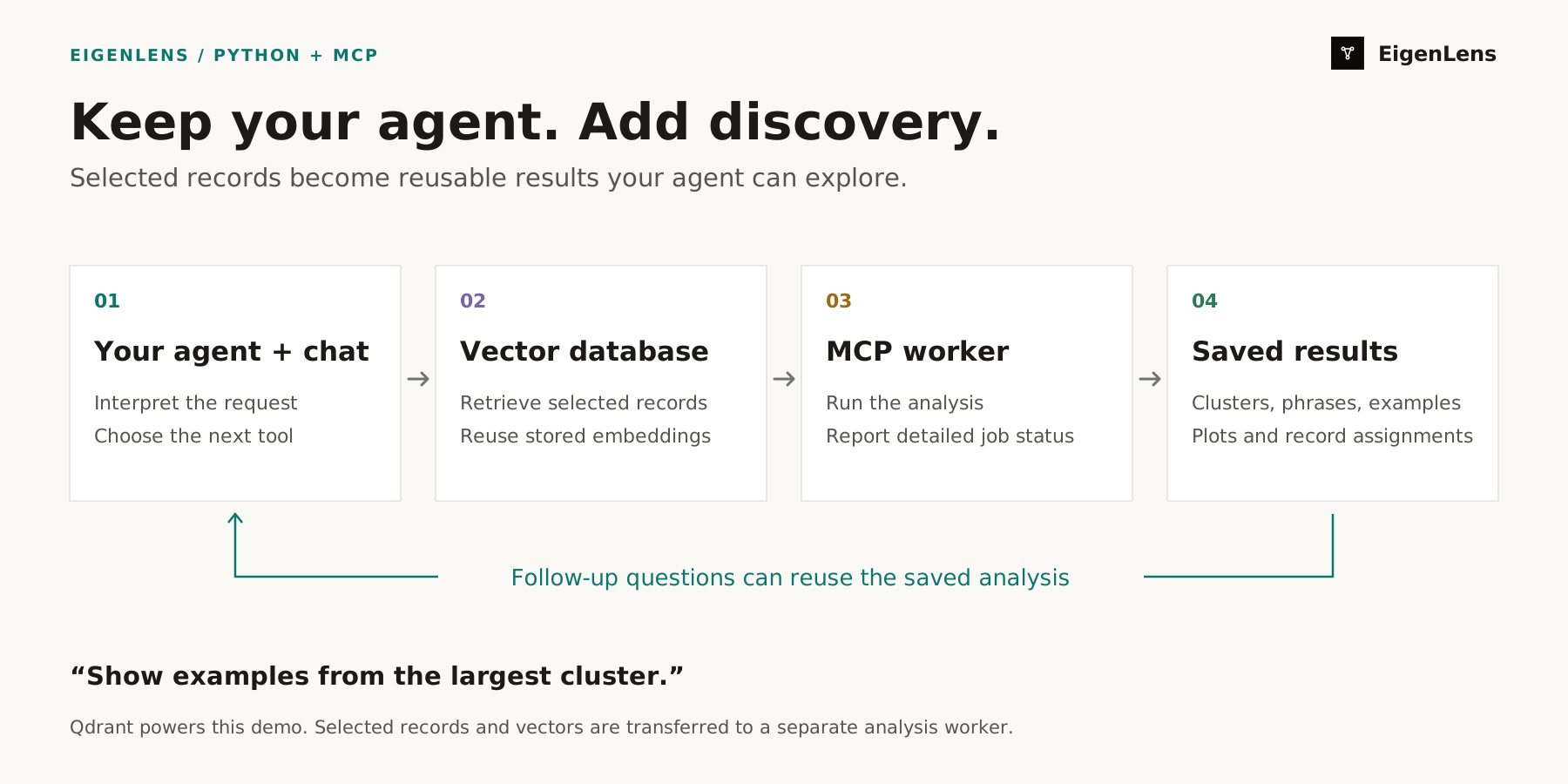
In the MCP workflow, selected records and stored vectors are transferred to a separate worker for analysis. The agent receives structured results. Through MCP, it can submit a job, check status and detailed stages, and fetch summaries, assignments and examples.
The chat interface presents progress and plots. Follow-up questions such as “Show examples from the largest cluster” or “Show topic 3 in 3D” can reuse saved results without another analysis.
Use the agent setup guide to connect your existing agent to the EigenLens MCP server.
Try the example
Use an existing compatible collection or the 20,000-report text sample. The sampling manifest includes source details and checksums; embeddings are not included.
Generate embeddings, index the records in Qdrant and record the model information. Follow the setup guide to connect your agent to EigenLens MCP. With the collection and selection configured, request:
Show clusters in continuous glucose monitoring problems.
Then inspect the groups and follow the source examples. Counts depend on the query, dataset and analysis settings. The current workflow has configured capacity limits; this demonstration does not establish performance at millions of records.
Get started · Download the text sample
Experiment notes
- Data: reservoir sample, seed 42, from
device-event-0001-of-0010.json; source metadata last updated October 21, 2026. See openFDA downloads and data licensing. - Embeddings:
sentence-transformers/all-MiniLM-L6-v2, revision 1110a243; 384 dimensions, L2-normalized. - Baseline: exact cosine search, threshold 0.4; all top-N selections were prefixes of one top-50 response. Full narratives and report IDs were supplied to
nvidia/nemotron-3.5-lightning:free, with temperature 0, reasoning effort low and a 4,096-token completion budget. Instructions and the generation question were identical across N. - Retry: the first top-10 generation exhausted its budget in reasoning; one identical retry succeeded. No alternate model was used.
- Interpretation: cluster membership was checked afterward and was not supplied to the baseline model. These are patterns within the selected sample, not population-level failure rates or ground-truth categories.
Read the full baseline outputs and cluster explanations with source IDs.
Explore the patterns in your own vector data.
Get started